ImageMagick是一套Linux下的开源图形处理工具,针对几乎所有的图片格式提供比较全面的图片处理功能。不像windows下的photoshop,先要双击运行,然后打开图片,然后才能对图片进行处理,ImageMagick可以直接在命令行下运行,加上几个参数,就可以得到想要的图片了,而大批量的处理图片也比photoshop简单的多,写个shell多循环几次就可以了。
假如我想给图片加个框,转一下,再加个阴影,输入以下的命令就可以了:
convert -size 400x180 hatching.jpg  -thumbnail '200x90>'

    -bordercolor white  -border 6

    -bordercolor grey60 -border 1

    -background  none   -rotate 6

    -background  black  ( +clone -shadow 60x4+4+4 ) +swap

    -background  none   -flatten

    -depth 8 -colors 256 -quality 95   poloroid.png
结果是这样:

除了提供命令行工作,ImageMagick同样为各种语言(包括Java,perl,php,c/c++,pascal,python,ruby,tcl/tk等)提供了丰富的开发接口。开发人员可以直接使用这些接口对图片进行高质量,效果丰富的处理。这些都是ImageMagick处理的效果:
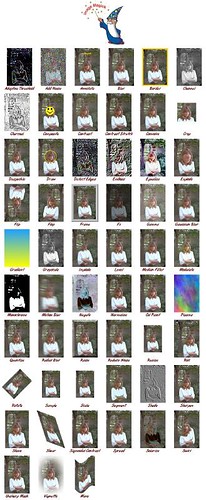
更多的效果:Anthony Thyssen写的使用帮助,一些缩略图的效果,一些汽泡状缩略图效果。ImageMagick还有个比较酷的功能是可以做图片的比较:
![[IM Output]](http://www.cit.gu.edu.au/~anthony/graphics/imagick6/compare/bgnd_overlaid.png)


ImageMagick安装起来也相当方便,以php为例,需要下载两个包,一个是ImageMagick的包,一个是MagickWand的包,打包下载后运行:
tar zxvf imagemagick.tar.gz

cd ImageMagick-xx-xx

./configure --prefix=/usr/local/ImageMagick

make && make install

export PATH=$PATH:/usr/local/ImageMagick/bin
这样ImageMagick就装完了,可以直接在任何一个目录下面运行命令行的程序了。下面我们假设机器上已经装好了某个版本的php,运行:
tar zxvf MagickWand.tar.gz

mv MagickWand-xx-xx /path/to/php-install/ext/

cd /path/to/php-install/ext/MagickWand-xx-xx/

phpize

cd /path/to/php-install

rm configure

./buildconf --force

./configure [options] --with-magickwand=/path/to/ImageMagick

make && make install
这样php就可以使用ImageMagick提供的函数了。
